Zone Balance
Zone Balance is a fitness watch face for Garmin Connect IQ watches, made by Echelon. Your heart-rate zones of the week as one glowing ring, and your easy / hard split against the 80 / 20 rule.
- Platform
- Garmin Connect IQ
- Price
- Coming soon
- Category
- Fitness
- Works on
- 64 Garmin watches
- Made by
- Echelon
Updated
About Zone Balance
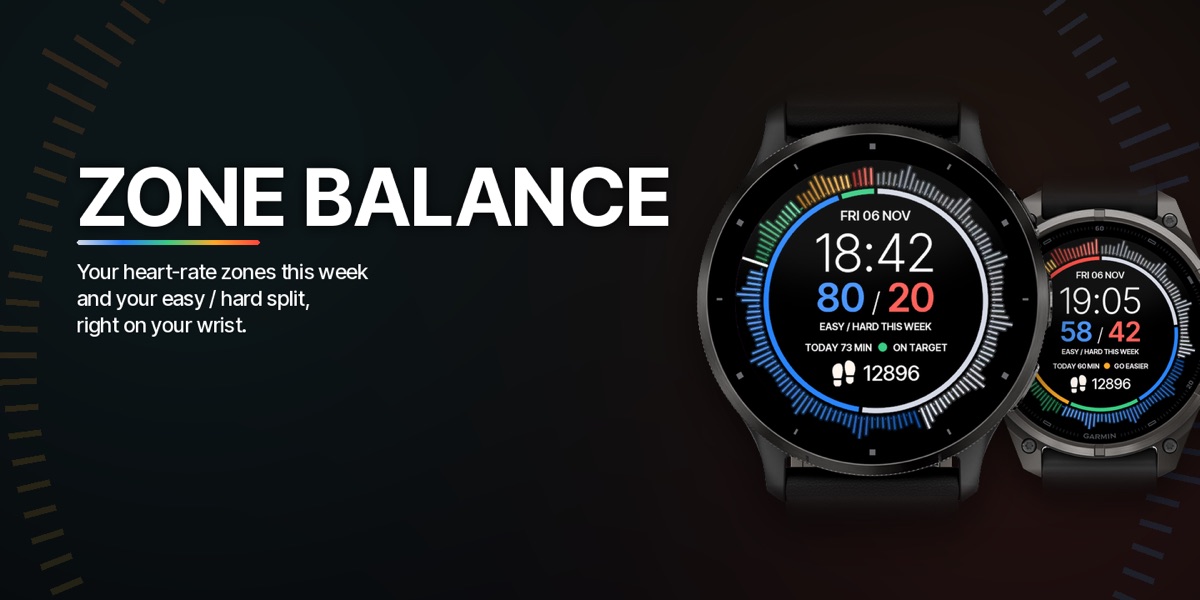
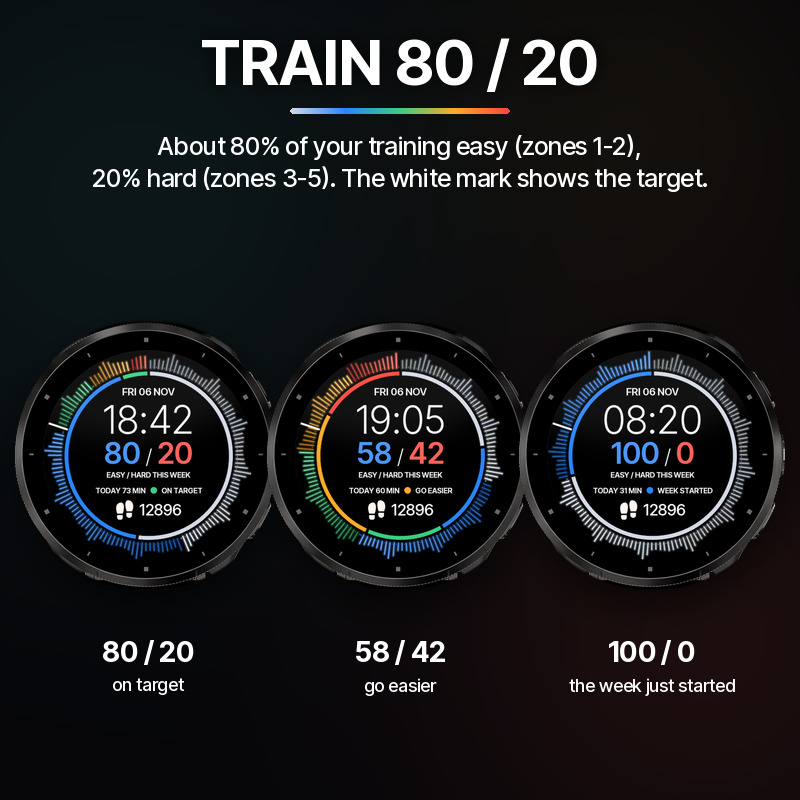
Zone Balance shows how you train this week, right on your wrist. Many runners and cyclists follow the 80 / 20 rule: about 80% of the training easy (heart-rate zones 1-2) and 20% hard (zones 3-5). Zone Balance shows your own split as a big number in the center, for example 80 / 20, and tells you if you are on target.
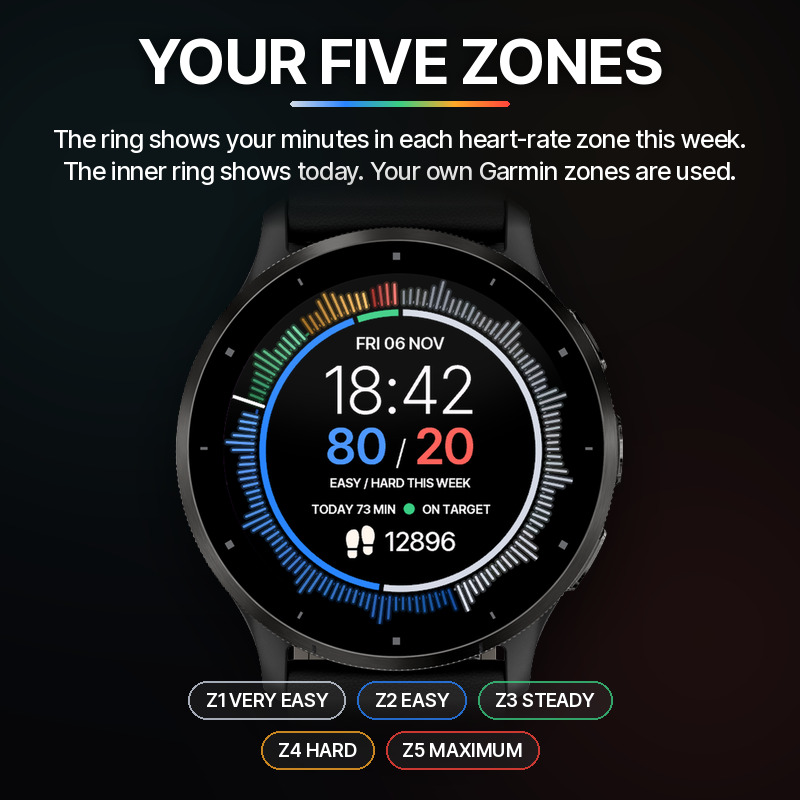
The ring around the watch face is your week in heart-rate zones. Each zone has its own color: silver for zone 1, blue for zone 2, green for zone 3, orange for zone 4 and red for zone 5. The more minutes you spend in a zone, the bigger its part of the ring. The bars rise like a heartbeat, and a white mark shows where 80% easy ends. The thin inner ring shows today's split.
Under the split you see today's training minutes and a status: ON TARGET: about 80% or more of your week was easy. GO EASIER: too much hard training this week, time for an easy day. WEEK STARTED: less than an hour so far this week.
Zone Balance uses your own heart-rate zones from your Garmin settings, so the zones match the rest of your watch. The week starts on the first day of the week set on your watch.
How the minutes are counted: the watch face reads the heart-rate history of your watch and adds up the time in each zone. Your watch keeps only a few hours of history, so the minutes are counted while the watch face runs and caught up when you come back to it. The numbers are an estimate and can differ from the zone times Garmin shows for your activities.
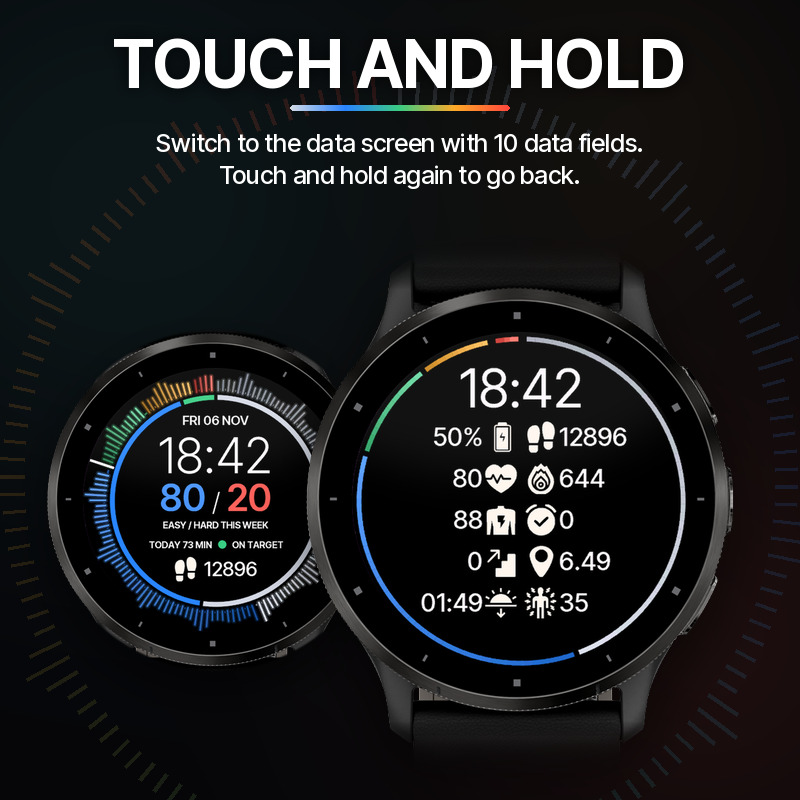
Below the status there is one data field of your choice (default: steps). Touch and hold the screen to switch to the data screen with 10 data fields. Touch and hold again to go back.
The always-on mode shows a thin, dimmed zone ring and the time.
Features
- Your easy / hard split this week (zones 1-2 vs. zones 3-5) against the 80 / 20 target
- Ring of your minutes in heart-rate zones 1-5 this week, with heartbeat-style bars
- Inner ring with today's zone split
- Today's training minutes and a status: on target, go easier or week started
- Uses your own Garmin heart-rate zones
- The week starts on your watch's first day of the week
- One data field on the main screen with 20 data types to choose from (default: steps)
- Touch and hold to switch to the data screen
- 10 custom data fields with 20 data types to choose from
- 33 icon colors
- 7 date formats
- Leading zero option for hours
- On-device settings
- AOD display
Data fields
- Steps
- Steps Goal %
- Distance
- Calories
- Heart Rate
- Active Minutes (Day)
- Active Minutes (Week)
- FITT Score
- Body Battery (if available)
- Stress Level (if available)
- Breaths per Minute
- Time to Recovery
- Floors Climbed
- Meters/Feet Climbed
- Altitude
- Battery %
- Notifications
- Weather Condition
- Chance of Precipitation
- Sunrise / Sunset
The watch face asks for access to your user profile only to read your heart-rate zones.
Supported watches
Zone Balance works on 64 Garmin watches with Connect IQ:
Approach
- Approach S50
- Approach S70 42mm
- Approach S70 47mm
- Approach S72 43mm
- Approach S72 47mm
D2
- D2 Air X10
- D2 Mach 1
- D2 Mach 2
- D2 Mach 2 Pro
Descent
- Descent G2
- Descent Mk3 43mm / Mk3i 43mm
- Descent Mk3i 51mm
epix
- epix (Gen 2) / quatix 7 Sapphire
- epix Pro (Gen 2) 42mm
- epix Pro (Gen 2) 47mm / quatix 7 Pro
- epix Pro (Gen 2) 51mm / D2 Mach 1 Pro / tactix 7 – AMOLED Edition
fēnix
- fēnix 8 43mm
- fēnix 8 47mm / 51mm / tactix 8 47mm / 51mm / quatix 8 47mm / 51mm
- fēnix 8 Pro 47mm / 51mm / MicroLED / quatix 8 Pro 47mm / 51mm
- fēnix 9 43mm
- fēnix 9 47mm / 51mm
- fēnix 9 Pro 43mm
- fēnix 9 Pro 47mm
- fēnix E
Forerunner
- Forerunner 70
- Forerunner 165
- Forerunner 165 Music
- Forerunner 170
- Forerunner 170 Music
- Forerunner 265
- Forerunner 265s
- Forerunner 570 42mm
- Forerunner 570 47mm
- Forerunner 965
- Forerunner 970
Instinct
- Instinct 3 AMOLED 45mm
- Instinct 3 AMOLED 50mm
- Instinct Crossover AMOLED
MARQ
- MARQ (Gen 2) Athlete / Adventurer / Captain / Golfer / Carbon Edition / Commander - Carbon Edition
- MARQ (Gen 2) Aviator
- MARQ (Gen 3) Athlete / Adventurer / Aviator / Commander / Golfer / Diver
Venu
- Venu 2
- Venu 2 Plus
- Venu 2S
- Venu 3
- Venu 3S
- Venu 4 41mm
- Venu 4 45mm / D2 Air X15
vívoactive
- vívoactive 5
- vívoactive 6
Zone Balance questions
What is Zone Balance?
Zone Balance is a fitness watch face for Garmin Connect IQ watches, made by Echelon. Your heart-rate zones of the week as one glowing ring, and your easy / hard split against the 80 / 20 rule.
Which watches does Zone Balance work on?
Zone Balance works on 64 Garmin watches with Connect IQ, including Forerunner 970, Forerunner 965, fēnix 9 Pro, fēnix 9, Venu 4, Venu 3S, vívoactive 6, vívoactive 5. The full list is on this page and in the Connect IQ Store.
How much does Zone Balance cost?
Zone Balance is coming soon and not in the store yet.
Does Zone Balance need a phone connection?
No. Zone Balance runs on the watch. Only the weather data fields need the Garmin Connect app on your phone, which syncs the weather to the watch.